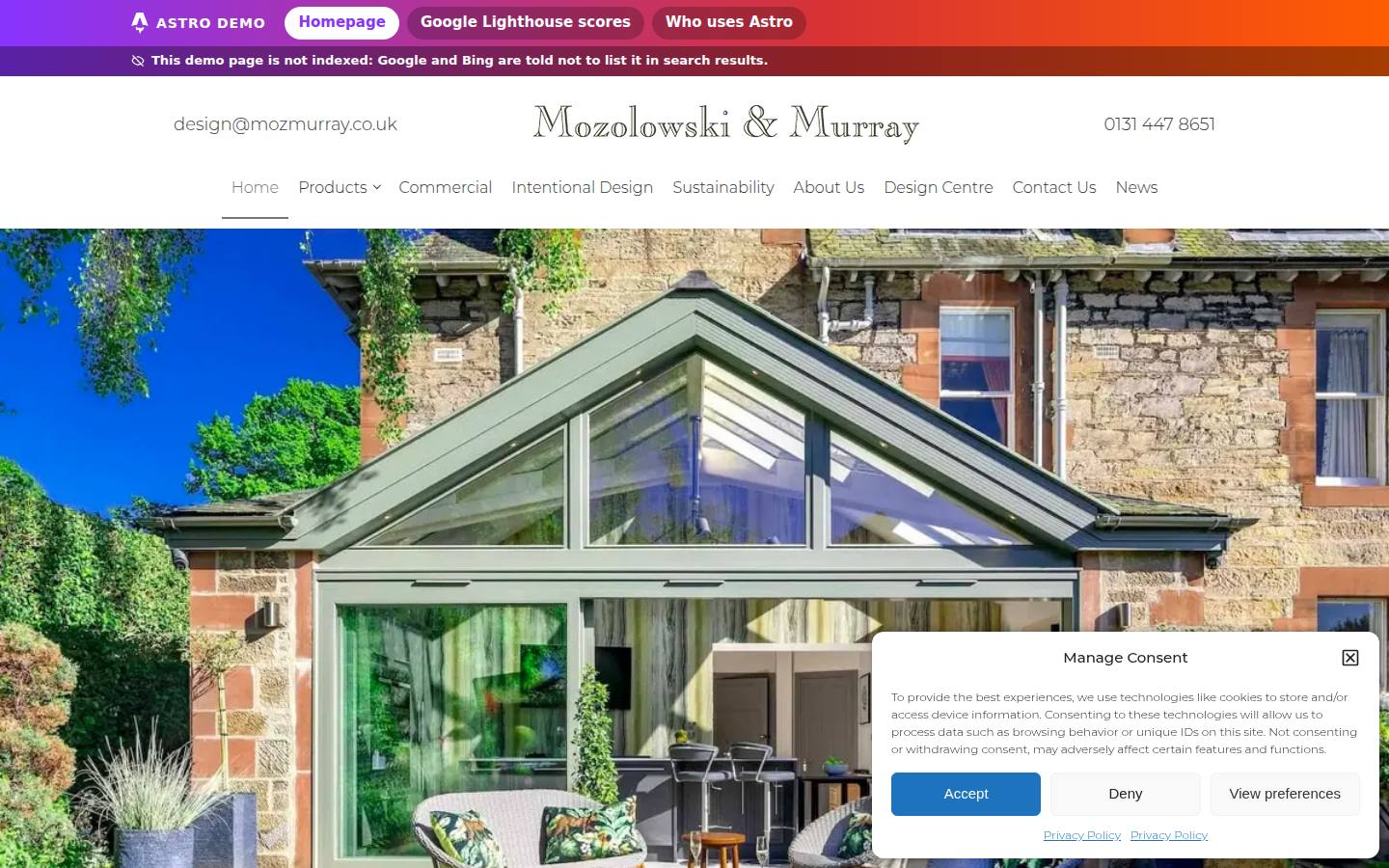

Mozolowski & Murray homepage

WordPress today vs Astro

The same homepage, measured side by side with Google Lighthouse, the test Google uses to score page speed and quality. Measured 30 September 2026 at 19:04, UK time.

Overall improvement moving to Astro

📱 On a phone+19%overall Google Lighthouse score: 83.8 → 99.8 out of 100Main content appears 90% faster
🖥 On a desktop+9%overall Google Lighthouse score: 91.5 → 100.0 out of 100Main content appears 71% faster

Security

🛡 Security settings, independent testB → A+Mozilla Observatory score 70 → 135 (+93%). Checks passed 10 of 12 → 12 of 12.100 is full marks; sites earn extra points for best-practice settings. Test mozmurray.co.uk yourself · test this demo
🔒 Parts an attacker can reach15 → 0100% removed: no server code, database, admin login or plugins behind the Astro site.
What is counted on mozmurray.co.uk
  • The WordPress application, running on the server for every visit
  • The database behind it
  • The public admin login page
  • Plugins running on the server (6)
  • Third-party tracking scripts on every visit (6)

Overall score = the average of the four Lighthouse scores (Performance, Accessibility, Best Practices, SEO), each the middle result of 5 runs. Security settings tested with Mozilla HTTP Observatory on 30 September 2026 (raw result, live · raw result, demo).

Today on WordPress

mozmurray.co.uk ↗

Today on WordPress: homepage screenshot
63
Performance
91
Accessibility
96
Best Practices
85
SEO
Main content visible
17.5 s
First thing on screen
1.8 s
Page visibly complete
6.9 s
Frozen to taps and clicks
290 ms
Layout jumping
0.00

The same page on Astro

this demo ↗
The same page on Astro: homepage screenshot
99
Performance
100
Accessibility
100
Best Practices
100
SEO
Main content visible
1.8 s
First thing on screen
1.0 s
Page visibly complete
2.2 s
Frozen to taps and clicks
0 ms
Layout jumping
0.00

What Astro changes on a phone

+36Performance points
+9Accessibility points
+4Best Practices points
+15SEO points
90% fasterMain content visible
68% fasterPage visibly complete

Today on WordPress

mozmurray.co.uk ↗
Today on WordPress: homepage screenshot
90
Performance
91
Accessibility
100
Best Practices
85
SEO
Main content visible
1.7 s
First thing on screen
400 ms
Page visibly complete
1.3 s
Frozen to taps and clicks
120 ms
Layout jumping
0.00

The same page on Astro

this demo ↗
The same page on Astro: homepage screenshot
100
Performance
100
Accessibility
100
Best Practices
100
SEO
Main content visible
500 ms
First thing on screen
300 ms
Page visibly complete
300 ms
Frozen to taps and clicks
0 ms
Layout jumping
0.00

What Astro changes on a desktop

+10Performance points
+9Accessibility points
0Best Practices points
+15SEO points
71% fasterMain content visible
77% fasterPage visibly complete

Why move

Risk today, and what replaces it

The risk of staying on WordPress

  • Most weak points come from plugins. Patchstack found that 91% of new WordPress vulnerabilities found in 2025 were in plugins, not in WordPress itself. Every plugin is another supplier’s code running on your server.
  • Every update is an untested change. WordPress, the theme and each plugin update on their own schedules. Any update can add scripts to every page, change how pages load or clash with another plugin, so speed and layout can drop without anyone editing the site.
  • Keeping it fast is a permanent job. Holding the scores means re-testing after every update, for as long as the site runs. Without that, speed can slip away unnoticed.

What we saw on mozmurray.co.uk (30 September 2026)

  • The WordPress version is not shown publicly (the host has switched off the RSS feed that usually reveals it)
  • 6 plugins visible in the homepage code: Oxygen page builder (version 4.9.7), Complianz cookie consent, CleanTalk spam protection, 3D FlipBook, Responsive YouTube & Vimeo Popup and a custom functionality plugin
  • The WordPress admin login page is open to anyone on the internet
  • The XML-RPC remote-access endpoint is blocked, and the public list of user accounts is not exposed (both good)
  • At least six tracking tools load on every visit: Google Tag Manager, Google Analytics, Google Ads, Microsoft Clarity, Microsoft Advertising and the LinkedIn Insight Tag
  • On our first visit, with no clicks, Google, Microsoft and LinkedIn analytics and advertising cookies were set before the cookie notice was answered

Publicly visible facts from the live homepage. They show how much is exposed and maintained, not that the site has been attacked.

What Astro gives you

  • Fast by design, not by tuning. Pages are built in advance and send no JavaScript unless a part of the page needs it. The scores above were measured, not promised.
  • No plugins, no server code to patch. There is no database, admin login or plugin on the live site for anyone to attack.
  • Speed checked before every release. Every change is tested with the same Google Lighthouse and look-alike checks shown on this page before it goes live, so speed cannot drift quietly.

What Cloudflare gives you

  • DNS: the foundation. Your domain and email records run on Cloudflare’s DNS, which Cloudflare describes as “consistently measured as one of the fastest” in the world.
  • Firewall in front of the site. Cloudflare’s web application firewall is available on all plans; its Free Managed Ruleset gives “protection against high-impact and widely exploited vulnerabilities”.
  • Attack and bot protection, always on. DDoS protection is “always on for all Cloudflare plans”, and Bot Fight Mode on the free plan challenges known bad bots.
  • One provider for the full service. DNS, firewall, delivery from data centres near every visitor, and hosting (Cloudflare Pages, which runs this demo) in one place.

Sources: Patchstack: State of WordPress Security in 2026 · Cloudflare DNS · Cloudflare WAF managed rules · Cloudflare security features (checked 30 September 2026).

What we would build for Mozolowski & Murray

Three layers, each doing one job

WordPress does everything in one place: pages, database, plugins, images and security. Here each job goes to a specialist, and the content layer is only added when it earns its place.

  1. 3. Content, when neededContent management (CMS), digital assets (DAM) and product information (PIM)
    • CMS: your team edits the site. An editing workspace built around your content, with live preview: “content teams see changes instantly without waiting for builds or deployments.” Official Astro integration.
    • DAM: one home for images and files. Sanity Media Library lets teams “manage assets in a centralized place… then use them across your entire organization.”
    • PIM: one source for product data. Holds products, variants and their images together, and can “connect all product information from all your sources like ERPs, MDM, PLMs and unify all information in one place.”

    When: Add it only when you need it: CMS if your team edits pages often; DAM for a large image and document library; PIM for a product catalogue.

  2. 2. WebsiteThe pages your visitors see
    • Ready-made pages. Every page is built in advance, so there is nothing to assemble when a visitor arrives. That is where the scores above come from.
    • No code visitors don’t need. Astro sends no JavaScript to the browser unless a part of the page needs it.
    • Nothing to hack on the server. No login page, database or plugins sit behind the Mozolowski & Murray site.

    When: Always. It replaces WordPress for the pages.

  3. 1. FoundationCloudflareDNS, global network, security and hosting
    • Your domain’s address book (DNS). Cloudflare runs the DNS that points your domain and email to the right places. Cloudflare describes its DNS as “consistently measured as one of the fastest” in the world, and it is free.
    • Served close to every visitor. Pages are delivered from a Cloudflare data centre near each visitor, not from one server in one building.
    • Firewall and attack protection. A web application firewall filters attacks before they reach the site, and DDoS protection (against floods of fake traffic) is always on.
    • Hosting. This demo already runs on Cloudflare Pages: no web server, database or plugins to patch.

    When: Always. Every site starts here.

Vendor statements quoted from: Cloudflare DNS · Sanity and Astro · Sanity Media Library · Sanity for PIM (checked 30 September 2026).

How we measured, and exactly what is different on the Astro version

Raw results: mobile WordPress: 1 2 3 4 5 · mobile Astro: 1 2 3 4 5 · desktop WordPress: 1 2 3 4 5 · desktop Astro: 1 2 3 4 5 · Re-run yourself: WordPress site · Astro version